Tool management in trade show construction: tool tracking with QR codes
Tool tracking instead of tool hunting: the hammer drill at show A, the cable drums somewhere in the warehouse – in trade show construction, searching for tools costs hours. With FairFlow's QR code tool management you always know where every tool is: in the warehouse, in a vehicle, at the booth or with a person.
Label and scan tools with a QR code
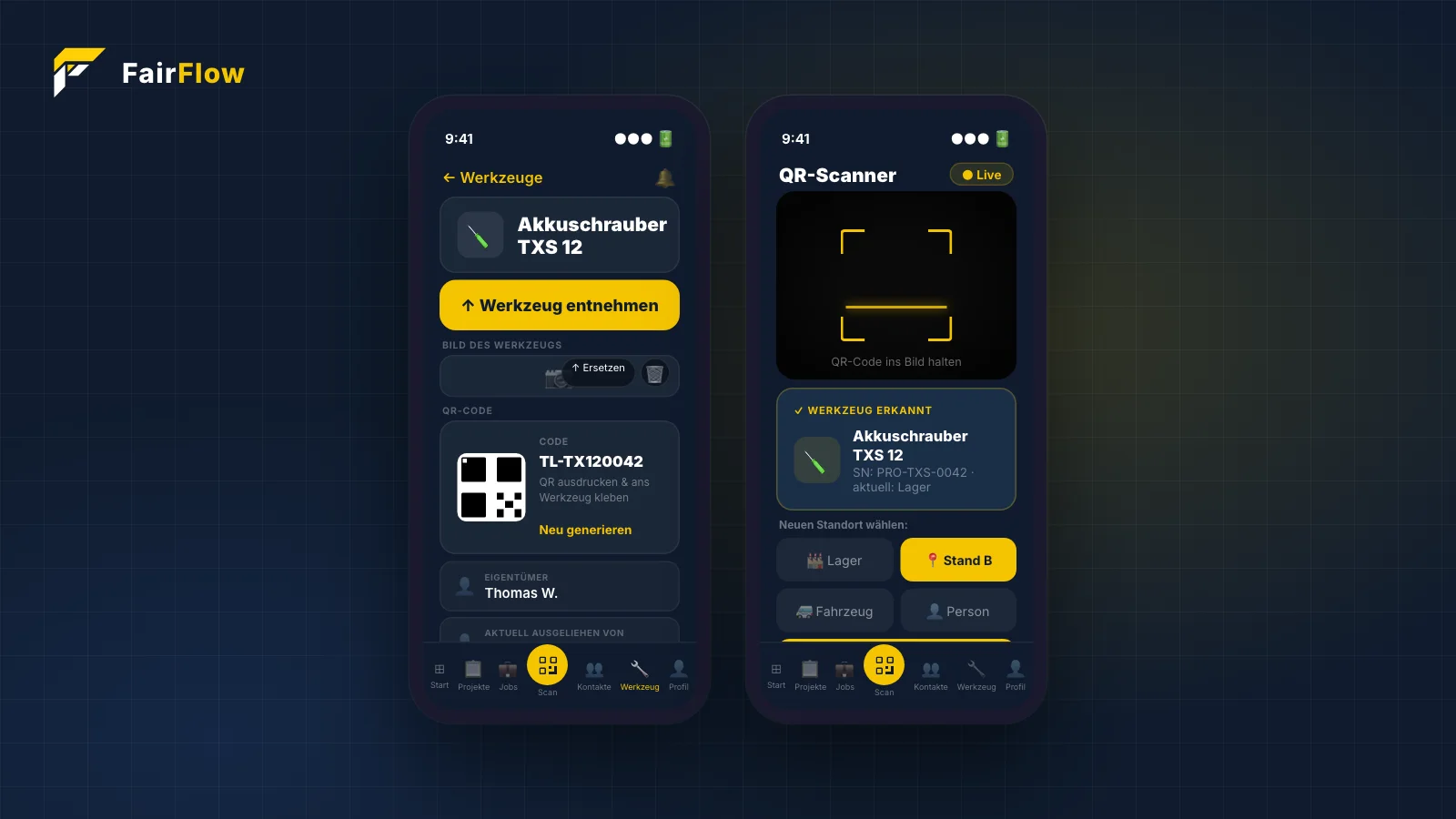
Every tool gets its own QR code in FairFlow, which you print and stick on. A camera scan in the app opens the tool directly – alternatively, you can enter the serial number manually.
Location and status: warehouse, vehicle, booth or person
When scanning, you set the location: warehouse, vehicle, booth or person. In addition, every tool has a status – available, in use, maintenance or missing. Every movement is saved automatically in the movement history.
Tool loans and tool requests between booths
The detail page shows photos of the tool and its container, the QR code, owner, borrower and current location. With “take tool”, a loan is done with one tap. If another booth needs a tool, it sends a request – approval happens right in the app and the movement is saved.
QR tool tracking at a glance
- Printable QR code for every tool
- Locations: warehouse, vehicle, booth, person
- Status: available, in use, maintenance, missing
- Automatic movement history
- Photos of tool and container, owner and borrower
The feature in the FairFlow app
Sample app views with demo data.
Every tool — always in view.
Foto des Werkzeugs und Behälters, eindeutiger QR Code, Owner, Standort und wer es gerade hat — alles auf einer Seite. Ein Scan öffnet das Werkzeug direkt.
- ✓Store photo of the tool + tool container
- ✓QR Code generieren, ausdrucken & aufkleben
- ✓Owner, Ausleiher und aktuellen Standort sehen
- ✓„Werkzeug entnehmen" — Ausleihe mit einem Tap
Scan & location — in 2 seconds.
Point camera at the QR sticker, select location, done. The tool is immediately booked and the movement logged — no typos, no searching.
- ✓Kamera-Scan erkennt QR Codes in Echtzeit
- ✓Instantly select location: Warehouse / Booth / Vehicle / Person
- ✓Detected tool with serial number directly confirmed
- ✓Movement history is updated automatically
Frequently asked questions
How exactly does the tool tracking work?
Each tool gets a QR code (you print it out and stick it on). A camera scan in the app immediately shows where the tool is and you can change the location — warehouse, vehicle, booth, or person. The movement history is automatically saved.
Try FairFlow yourself
Start for free and experience the features at your next trade show.
Start for free →